The video stays foreign. The subtitles turn into your language.
Hover a captioned video, click «Translate», and translated lines appear over the picture in time with speech — on YouTube, in a lecture player, on a news site, or over a subtitle file you load yourself. Chrome translates on your computer; nothing leaves it.
Add Translate Video to Chrome — free
- Translated on-device with Chrome's built-in model
- Works with the captions a player already shows
- Keeps the original line visible if you want it
Captions exist — but not in your language
A conference talk with only English captions, a recipe channel with Korean ones, a course where the lecturer speaks Spanish. The player has subtitles, just not for you. YouTube auto-translation is limited to YouTube and often to a few languages; copying lines into a translator site breaks the flow of watching; downloading the video to run a tool over it is an evening of work for twenty minutes of content.
Open the video, press Translate
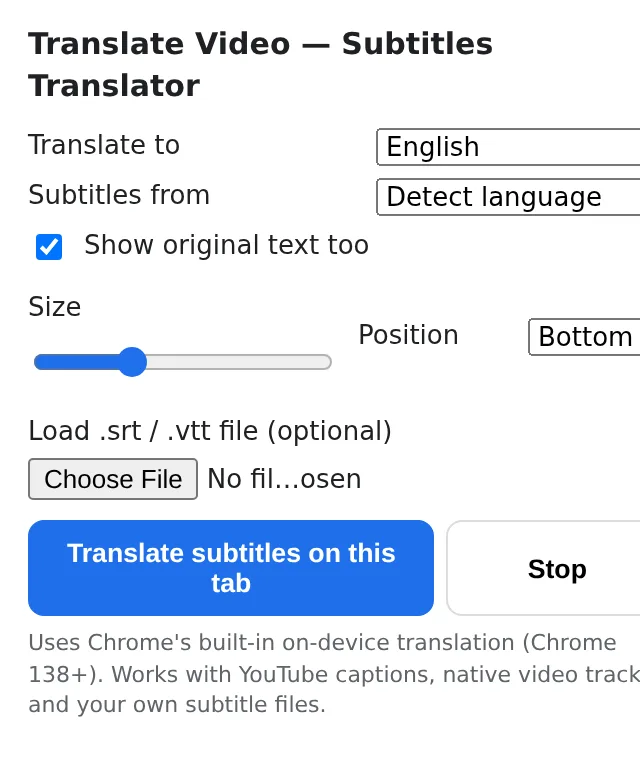
Any video that has captions gets a small button in its corner on hover. Click it — or open the popup and press «Translate subtitles on this tab» — and translation starts within a second.
Pick how you read
Choose the target language once; it is remembered. Show the original line above the translation when you are learning, set the text larger for a TV across the room, move the overlay to the top if the player's own captions sit at the bottom.
Load your own file when the player has none
Have the captions as a file from the course or the series? Drop it in the popup: the extension times it against the video and translates each line as it comes up.
What you get on screen
A translated subtitle line that follows the speech, redrawn every time the player changes its caption. The translation is produced by Chrome's own language model (Chrome 138 or newer) — the first translation into a new language downloads that language pack, after that it works offline. The caption text is never sent to a server by this extension, so lectures under NDA and private videos are as safe as watching them without captions.
The course in a language you half know
Jonas follows a data-science course recorded in English with English captions. He keeps both lines on — the original above, German below — and stops pausing every time a term goes by too fast.
Grandmother's favourite series
The episodes come with Portuguese subtitles in an .srt file, and the family player shows them only in Portuguese. The file goes into the popup, the overlay reads in Russian, the evening is saved.
A product demo from a partner abroad
A supplier posts walkthroughs on its own site with native HTML5 captions in Japanese. The procurement team hovers, clicks, and reads along in English without asking anyone for a translated version.
How this differs from the usual ways to understand a foreign video
| YouTube's auto-translate | only on YouTube, only when the uploader allows it | Translate Video: any site with captions, plus your own subtitle files |
|---|---|---|
| Online subtitle translators | upload the file, wait, download, load it back into a player | Translate Video: translated live over the video you are already watching |
| Cloud translation extensions | send every caption line to a server | Translate Video: translated by Chrome on your device; works offline after the first download |
| Dubbing / AI voice-over tools | minutes of processing, paid per video | Translate Video: instant, free to try, one Pro for every ExtSpace extension |
FAQ
Which videos does it work with?
Any video that shows captions the page can read: YouTube with CC on, players using native HTML5 text tracks, and any video you pair with a subtitle file loaded in the popup. Videos without captions of any kind cannot be translated — the extension translates text, it does not transcribe speech.
Is the text sent anywhere?
No. Translation uses Chrome's built-in Translator API, which runs a language model on your computer. The extension has no server for captions and needs no account.
Why does it need Chrome 138 or newer?
The on-device translation model shipped with Chrome 138. Older versions and browsers without the API show a hint instead of translating.
Can I see the original and the translation together?
Yes — switch on «Show original text too» and the original line is shown above the translated one, which many people use for language learning.
How many translations are free?
The free version includes several translation sessions per installation. Translate Video Pro removes the limit and unlocks every other ExtSpace extension with the same subscription.

Translate Video
Watch a video in a language you don't speak: Translate Video turns the captions a player shows into a translated overlay, on-device, in sync with speech. Free, no account, no upload.
Add Translate Video to Chrome — free